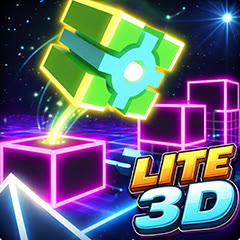
Geometry Dash Lite 3D is a fan-made rebuild of the free version of the rhythm platformer, with the same opening levels and a three-dimensional camera bolted on. It runs in the browser — no download, no account, no install.
How to play Geometry Dash Lite 3D
Click, tap or press space to jump. Hold and the icon jumps again as soon as it lands. It scrolls forward without waiting for you, and one collision restarts the level immediately — no lives, no continues, no cost.
Because it is built on Lite rather than the full game, the level list is the opening stretch: the part that teaches jump spacing, hold-to-chain and the basic obstacle vocabulary.
What carries over from Lite, and what does not
The rebuild keeps the rules and loses the structure, which is worth knowing before you start:
- Kept — the physics timing, the one-button input, the instant restart, the practice mode checkpoints.
- Kept — the level designs, so anything you learned in Geometry Dash Lite transfers directly.
- Changed — the camera. Depth replaces silhouettes, and a jump that reads correctly can land short until your eye calibrates.
- Missing — the editor and the online level browser, which were never part of Lite to begin with.
The result is a useful training build: the same lessons as Lite, with an extra perceptual challenge layered on top. When the camera stops being the hard part, Geometry Dash 3D and Geometry Dash Breeze 3D both push the speed further.
Tips for Geometry Dash Lite 3D
Relearn one level, not all of them
Pick a single level and clear it three times before moving on. That is faster than spreading attempts across the whole list.
Use practice mode to map depth
Set a checkpoint before a gap you keep misjudging, then jump it from a standing start repeatedly. Depth errors become obvious when the approach is identical each time.
Watch the landing, not the takeoff
The useful information is where you come down. Watching the jump itself tells you nothing about whether the distance was right.
FAQ
Is Geometry Dash Lite 3D official?
No. It is a fan-made 3D rebuild of the free Lite version, not a RobTop release.
What levels does it include?
The opening levels from Lite rather than the full game's list. The editor and online levels are not included.
Is it free?
Yes. It plays in the browser with no account, no install and no payment.
Is it a good place to start with Geometry Dash?
It is a reasonable one if you want the 3D presentation from the beginning. If you want the cleanest introduction to the rules, the flat Lite is easier to read.







 Arcade
 Driving
 Action
 io
 Shooting
 Sports
 Adventure
 Simulation
 Word
 Trivia